> ## Documentation Index
> Fetch the complete documentation index at: https://docs.x.com/llms.txt
> Use this file to discover all available pages before exploring further.
# X API v2 でユーザーの投稿とメンションを探索する
> user Post timeline および user mention timeline エンドポイントを使うと、あるユーザーが作成した公開投稿、またはそのユーザーへのメンションを取得できます。
## はじめに
[recent search エンドポイント](/x-api/posts/search/introduction)では過去 7 日以内の投稿しか取得できませんが、user Post timeline および user mention timeline エンドポイントを使えば、認可されたユーザー(ユーザー ID を使用)について、過去 7 日より古い投稿やメンションを取得できます。デベロッパーはこれらのエンドポイントを利用して、ユーザーのタイムラインやメンションからトピック、エンティティ、投稿のセンチメントを研究できます。このチュートリアルでは、user Tweet timeline および user mention timeline エンドポイントを使ってユーザーの投稿とメンションを探索する方法を紹介します。
## 前提条件
* user Tweet timeline および user mention timeline エンドポイントを利用するには、有効なデベロッパーアカウントが必要です。
* [Project](/resources/fundamentals/developer-apps) を作成しておく必要があります。
* デベロッパーアカウントに[サインアップ](https://developer.x.com/en/portal/petition/essential/basic-info)し、[新しい Developer Console 体験](https://developer.x.com/en/portal/opt-in.html)を有効化している必要があります。
* アクセスには、[Developer Console](/resources/fundamentals/developer-portal) で作成した [Project](/resources/fundamentals/developer-apps) に紐づいたデベロッパーアプリの有効なキーおよびトークンが必要です。
* [X Developer Console](/resources/fundamentals/developer-portal) のアプリから取得した Bearer Token。
* 承認済みのデベロッパーアカウントをお持ちでない場合は、[こちらから申請](https://developer.x.com/en/apply-for-access)できます。
## 承認済みデベロッパーアカウント
まだお持ちでない場合は、[こちらから申請](https://developer.x.com/en/apply-for-access)できます。
## Project を作成しアプリを接続する
[Developer Console](https://developer.x.com/en/portal/dashboard) で「create a new App」をクリックします。
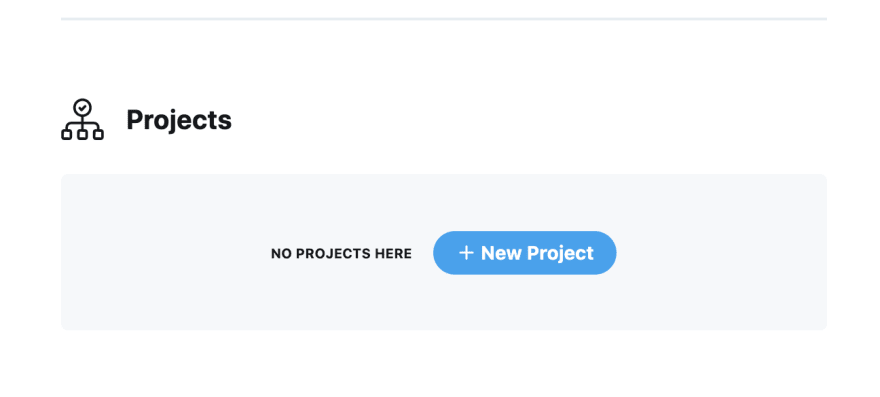 名前を付け、適切なユースケースを選択し、Project の説明を入力します。次に、新しいアプリを作成するか、既存の[アプリ](/resources/fundamentals/developer-apps)を接続できます(アプリは、X API へ HTTP リクエストを送るために必要な API キーを格納するコンテナです)。
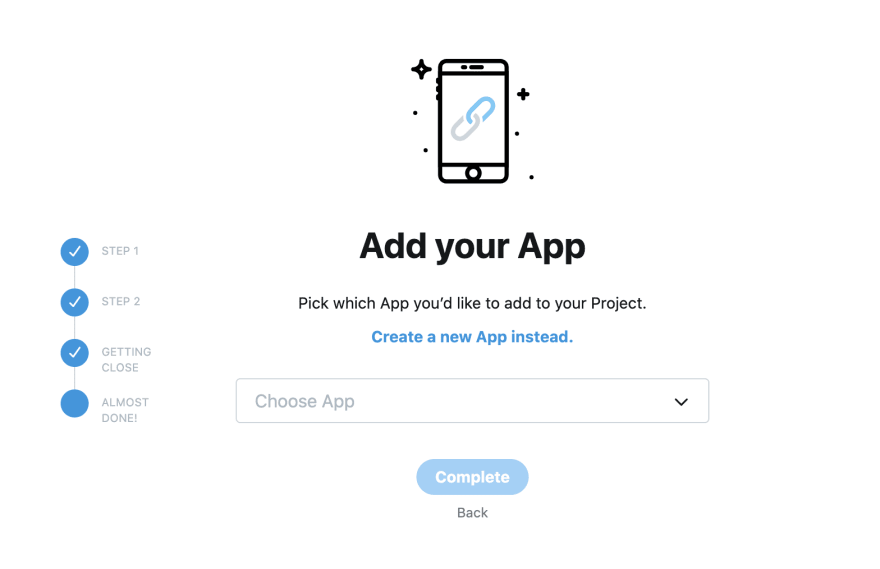 「create a new App instead」をクリックし、アプリ名を付けて新しいアプリを作成します。
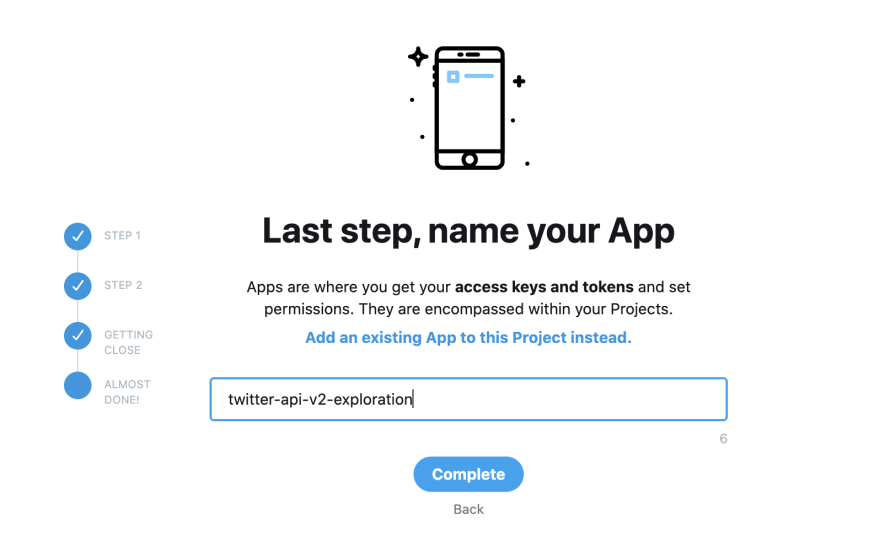 「complete」をクリックすると、API キーと Bearer Token が発行され、X API v2 の新しいエンドポイントへ接続する際に使用できます。
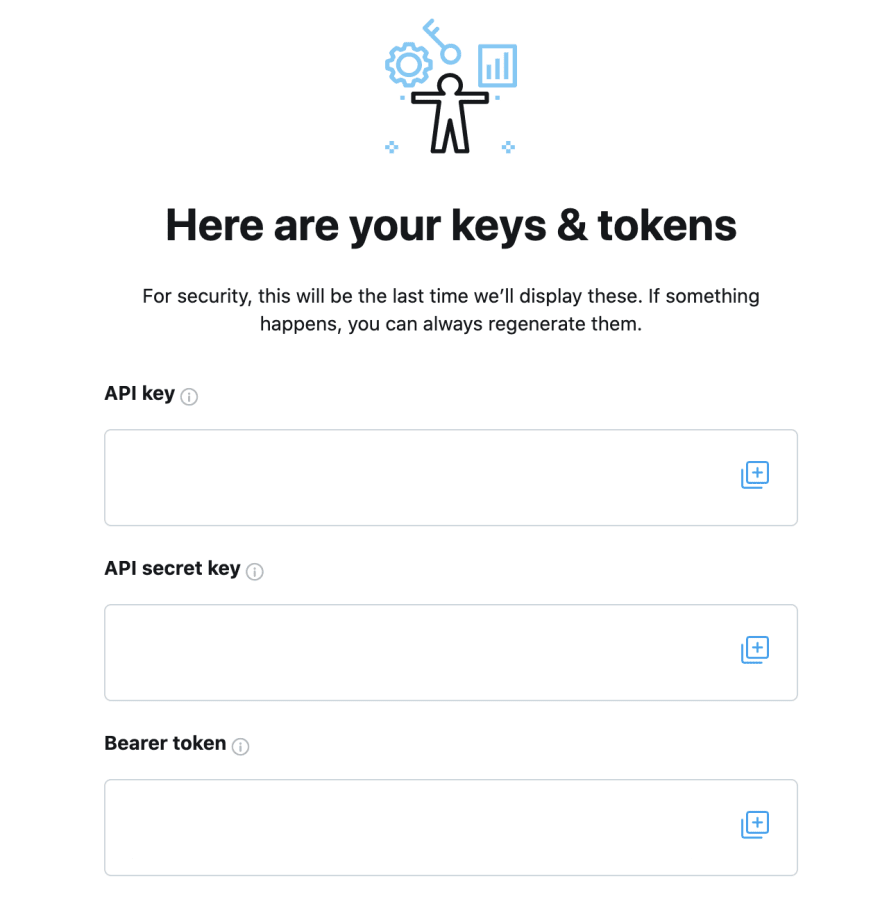 API key、API secret key、Bearer Token の横にある (+) をクリックし、これらの値をローカルマシンの安全な場所にコピーします。次のステップで API 呼び出しを行うために必要です。
注意: 上記スクリーンショットのキーは非表示になっていますが、ご自身の Developer Console では API key、API secret key、Bearer Token の実際の値を確認できます。
## user Tweet timeline / user mention timeline エンドポイントで使用するユーザーのユーザー ID を取得する方法
user Tweet timeline および user mention timeline エンドポイントは、ユーザー ID を用いて投稿を取得します。ユーザー名からユーザー ID を取得するには、新しい [user lookup エンドポイント v2](/x-api/users/lookup/quickstart/user-lookup) を使用できます。USER\_NAME を任意のユーザー名に、XXXX を上で取得した自分の Bearer Token に置き換えてください。
```bash theme={null}
curl --request GET 'https://api.x.com/2/users/by/username/USER_NAME --header 'Authorization: Bearer XXXXXX'
```
以下のようにレスポンスにユーザー ID が表示されます。
```json theme={null}
{
"data": {
"id": "2244994945",
"name": "Developers",
"username": "XDevelopers"
}
}
```
## user Tweet timeline および user mention timeline エンドポイントへの接続
ユーザーの Tweet timeline を取得するには、次の curl コマンドをターミナルで実行します(USER\_ID を任意のユーザー ID に、XXXX を上で取得した自分の Bearer Token に置き換えてください)。
```bash theme={null}
curl --request GET 'https://api.x.com/2/users/USER_ID/tweets' --header 'Authorization: Bearer XXXXXX'
```
これらのリクエストの JSON レスポンスには、デフォルトで投稿の ID と本文が含まれることが確認できます(以下は例です)。
```yaml theme={null}
{
"id": "1334200897081987072",
"text": "👀 If you are new to the X API v2, check out this step-by-step guide to making your first request https://t.co/4rZqThpSbp"
}
```
レスポンスに追加のフィールド(ユーザー情報や context annotations などの追加の Tweet フィールドなど)を含めたい場合は、レスポンスでそれらのフィールドを明示的に指定する必要があります。方法については[fields および expansions の使い方に関するガイド](/x-api/fundamentals/data-dictionary/reference#how-to-use-fields-and-expansions)を参照してください。
これらの投稿は、任意のプログラミング言語でも取得できます。user Tweet timeline および user mention timeline エンドポイントに対する Python、Node (JavaScript)、Java、Ruby のサンプルコードは、[GitHub リポジトリ](https://github.com/xdevplatform/Twitter-API-v2-sample-code)をご確認ください。
## ユーザーの投稿を探索する
user Tweet timeline および user mention timeline エンドポイントで投稿を取得する方法が分かったら、投稿を探索していきましょう。たとえば、ユーザーのメンションに含まれる一般的な名前付きエンティティを特定したい場合は、次のようにできます。
API リクエストで、Tweet レスポンスに context\_annotations オブジェクトを含めるように指定します。
```bash theme={null}
curl --request GET 'https://api.x.com/2/users/USER_ID/mentions?tweet.fields=context_annotations' --header 'Authorization: Bearer XXXXXX'
```
レスポンスでは、メンションに名前付きエンティティが含まれているかを確認できます。以下は例です。
```json theme={null}
{
"domain": {
"id": "47",
"name": "Brand",
"description": "Brands and Companies"
},
"entity": {
"id": "783214",
"name": "X"
}
}
```
メンションに登場する人気のエンティティを確認したい場合は、メンションの各 Tweet を解析することで、人気エンティティのカウントを保持できます。
タイムライン内のメディアを含むすべての投稿のプレビュー画像 URL を探索したい場合は、次のようにできます。
API リクエストで、tweet.media フィールドの preview\_image\_url と、attachments.media\_keys の expansions を指定します。
```bash theme={null}
curl --request GET 'https://api.x.com/2/users/2244994945/mentions?max_results=100&media.fields=preview_image_url&expansions=attachments.media_keys' --header 'Authorization: Bearer XXXXXX'
```
レスポンスの includes オブジェクトに、以下のように preview\_image\_url が含まれます。
```json theme={null}
{
"includes": {
"media": [
{
"media_key": "16_1334657439640121344",
"preview_image_url": "https://pbs.twimg.com/tweet_video_thumb/EoWn3rqU8AAtFWL.jpg",
"type": "animated_gif"
}
]
}
}
```
ユーザーの投稿の扱い方が分かれば、他の API やサービスと組み合わせて、投稿でさらに多くのことができるようになります。user Tweet timeline および user mention timeline エンドポイントを使う際に役立つリソースを以下に紹介します。
## リソース
* [user Tweet timeline および user mention timeline エンドポイント](/x-api/posts/timelines/introduction)について詳しく学ぶ。
* [user Tweet timeline エンドポイントの API リファレンス](/x-api/users/get-posts) で、利用可能な機能を確認する。
* [user mention timeline エンドポイントの API リファレンス](/x-api/users/get-mentions) で、利用可能な機能を確認する。
* その他の[チュートリアル](/tutorials)を読んでインスピレーションを得る。
API key、API secret key、Bearer Token の横にある (+) をクリックし、これらの値をローカルマシンの安全な場所にコピーします。次のステップで API 呼び出しを行うために必要です。
注意: 上記スクリーンショットのキーは非表示になっていますが、ご自身の Developer Console では API key、API secret key、Bearer Token の実際の値を確認できます。
## user Tweet timeline / user mention timeline エンドポイントで使用するユーザーのユーザー ID を取得する方法
user Tweet timeline および user mention timeline エンドポイントは、ユーザー ID を用いて投稿を取得します。ユーザー名からユーザー ID を取得するには、新しい [user lookup エンドポイント v2](/x-api/users/lookup/quickstart/user-lookup) を使用できます。USER\_NAME を任意のユーザー名に、XXXX を上で取得した自分の Bearer Token に置き換えてください。
```bash theme={null}
curl --request GET 'https://api.x.com/2/users/by/username/USER_NAME --header 'Authorization: Bearer XXXXXX'
```
以下のようにレスポンスにユーザー ID が表示されます。
```json theme={null}
{
"data": {
"id": "2244994945",
"name": "Developers",
"username": "XDevelopers"
}
}
```
## user Tweet timeline および user mention timeline エンドポイントへの接続
ユーザーの Tweet timeline を取得するには、次の curl コマンドをターミナルで実行します(USER\_ID を任意のユーザー ID に、XXXX を上で取得した自分の Bearer Token に置き換えてください)。
```bash theme={null}
curl --request GET 'https://api.x.com/2/users/USER_ID/tweets' --header 'Authorization: Bearer XXXXXX'
```
これらのリクエストの JSON レスポンスには、デフォルトで投稿の ID と本文が含まれることが確認できます(以下は例です)。
```yaml theme={null}
{
"id": "1334200897081987072",
"text": "👀 If you are new to the X API v2, check out this step-by-step guide to making your first request https://t.co/4rZqThpSbp"
}
```
レスポンスに追加のフィールド(ユーザー情報や context annotations などの追加の Tweet フィールドなど)を含めたい場合は、レスポンスでそれらのフィールドを明示的に指定する必要があります。方法については[fields および expansions の使い方に関するガイド](/x-api/fundamentals/data-dictionary/reference#how-to-use-fields-and-expansions)を参照してください。
これらの投稿は、任意のプログラミング言語でも取得できます。user Tweet timeline および user mention timeline エンドポイントに対する Python、Node (JavaScript)、Java、Ruby のサンプルコードは、[GitHub リポジトリ](https://github.com/xdevplatform/Twitter-API-v2-sample-code)をご確認ください。
## ユーザーの投稿を探索する
user Tweet timeline および user mention timeline エンドポイントで投稿を取得する方法が分かったら、投稿を探索していきましょう。たとえば、ユーザーのメンションに含まれる一般的な名前付きエンティティを特定したい場合は、次のようにできます。
API リクエストで、Tweet レスポンスに context\_annotations オブジェクトを含めるように指定します。
```bash theme={null}
curl --request GET 'https://api.x.com/2/users/USER_ID/mentions?tweet.fields=context_annotations' --header 'Authorization: Bearer XXXXXX'
```
レスポンスでは、メンションに名前付きエンティティが含まれているかを確認できます。以下は例です。
```json theme={null}
{
"domain": {
"id": "47",
"name": "Brand",
"description": "Brands and Companies"
},
"entity": {
"id": "783214",
"name": "X"
}
}
```
メンションに登場する人気のエンティティを確認したい場合は、メンションの各 Tweet を解析することで、人気エンティティのカウントを保持できます。
タイムライン内のメディアを含むすべての投稿のプレビュー画像 URL を探索したい場合は、次のようにできます。
API リクエストで、tweet.media フィールドの preview\_image\_url と、attachments.media\_keys の expansions を指定します。
```bash theme={null}
curl --request GET 'https://api.x.com/2/users/2244994945/mentions?max_results=100&media.fields=preview_image_url&expansions=attachments.media_keys' --header 'Authorization: Bearer XXXXXX'
```
レスポンスの includes オブジェクトに、以下のように preview\_image\_url が含まれます。
```json theme={null}
{
"includes": {
"media": [
{
"media_key": "16_1334657439640121344",
"preview_image_url": "https://pbs.twimg.com/tweet_video_thumb/EoWn3rqU8AAtFWL.jpg",
"type": "animated_gif"
}
]
}
}
```
ユーザーの投稿の扱い方が分かれば、他の API やサービスと組み合わせて、投稿でさらに多くのことができるようになります。user Tweet timeline および user mention timeline エンドポイントを使う際に役立つリソースを以下に紹介します。
## リソース
* [user Tweet timeline および user mention timeline エンドポイント](/x-api/posts/timelines/introduction)について詳しく学ぶ。
* [user Tweet timeline エンドポイントの API リファレンス](/x-api/users/get-posts) で、利用可能な機能を確認する。
* [user mention timeline エンドポイントの API リファレンス](/x-api/users/get-mentions) で、利用可能な機能を確認する。
* その他の[チュートリアル](/tutorials)を読んでインスピレーションを得る。